
Sandvox is just the right tool for teachers to build a website for their classroom that will be useful for students and parents alike.
Some Examples of Sandvox in the Classroom
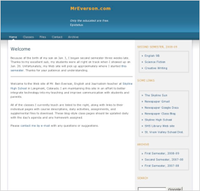
Benjamin Everson built his Website, “MrEverson.com,” as a blog of activities and assignments for the English and writing classes he teaches at Skyline High School in Longmont, Colorado. It contains daily updates about his classwork, files for students to download, and a contact form for reaching him via email. Though primarily created for his students and their parents, it has also proved useful to other teachers in developing their own lesson plans.
“I get complimented on my site by parents all the time,” he writes. “They love being able to verify the claims of ‘I don’t have any homework.’ I’ve also received compliments from administrators and resource teachers.”
Sandvox fit the bill for Mr. Everson. “I needed a site that would be minimal work once set up, and I needed powerful yet easy-to-use tools to handle that,” he told us. “Sandvox was the best solution because it provided a great mix of power, flexibility, and ease of use.”
Course information: To inform parents about the class their child is taking you can include a syllabus, course summary, lesson plan, and a list of objectives which will keep the students and parents informed on what they expect out of this course. This could cut down the number of questions such as grading scales, and other course related questions. With Sandvox, just create text pages as needed and type in your information, or just drag and drop PDFs, Word files, or text files into the site outline to build your content.
Contact between Parents and Teacher: Many parents would like to stay involved and aware of their children’s school habits. Parents may not have the time to go to their children’s school on a regular basis to find out how their child is doing. Parents can go right on your website and view daily assignments, homework, test scores, and so forth. Students Too: You can place on your website all the due dates of assignments and what days students may have a quiz or test. Now there can’t be any excuses that students forget when assignments were due or when they were going to have a test. Sandvox makes this easy by allowing you to quickly create content pages in any organization; these page can even be organized as blogs that savvy parents and students can subscribe to via the automatic RSS function. Hot topics such as current homework assignments can even be listed on the home page in the sidebar by using an Index object so the latest assignments are visible at a glance.
Classroom Blog: Your students (with your help) can participate in sharing what your class is doing. is could be an informative link to get the parents connected with the classroom. You can include write-ups of recent field trips, daily activities and so forth. You can add pictures that you may have took of the students on field trips and other activities. This will keep parents up to date and it’s a nice addition to your website.
Future Lessons and Activities: Posting a calendar of future lessons and activities will be great for you as well as your students. Now students can easily look online and show their parents what the upcoming lessons and activities are. If you are using Google Calendar, you can place a “Google Gadget” such as Google Calendar in the sidebar for an overview of your schedule.
Outside Links for Online Research: If you find websites that you would want your students to look over the information on them you can easily add a list of links to your website, in the sidebar or on a dedicated page. You can also embed Photos, QuickTime-compatible Movies, and YouTube videos directly in your website as appropriate. If you are assigning non-textbook reading, such as a summer reading list, you can include a list of links to Amazon.com.
Contact Form: With Sandvox, you have the opportunity of adding a Contact Form object to your pages, where parents or students and fellow teachers can directly contact you. Visitors can contact you easily and securely without even displaying your email address and exposing it to spammers.
If you’re a teacher or educator who needs to build a website, Sandvox is the web design application for you. Students use the internet regularly; if you want to make your teaching habits noticeable, create a website using Sandvox. Download a trial copy today and start building your educational website!