Document Inspector: Site Tab
This article details each of the settings in the "Site" tab of the Document Inspector.
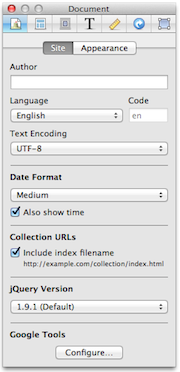
Author
The name of the creator of the site as you want it to appear to visitors. What you enter here will appear in a visitor's Window Title when viewing the site (unless it is overridden with a custom Window title.)
It also will appear in the hidden "author" information about each page; this is not visible to the site visitor.
It is also used by Spotlight when searching for Sandvox documents. Please see "Spotlight Support" for more information.
Language
Please see the "Site Language" article.
Text Encoding
The character encoding used for the HTML of every page.
Date Format
You can set the date format to:
- Long
- Displays as January 1, 2011
- Medium
- Displays as Jan 1, 2011
- Short
- Displays as 1/1/11
- Full
- Displays as Saturday, January 1, 2011
The "Also show time" checkbox sets whether displayed dates should include times as well.
Collection URLs
You can include index to the filename of your site. For example your site's URL would read www.mygreatsite.com/index.html instead of www.mygreatsite.com. This is useful if you are going to be exporting to a CD-ROM or creating a website for viewing locally; links to collections ending with "/" don't work this way from Safari.
jQuery Version
- 1.9.1 (Default)
- Loads the modern version of jQuery (1.9.1). The jQuery script is loaded at the bottom of the page, following website best practices.
- 1.5.2 (Legacy)
- Loads an older version of jQuery. The script is loaded in the <head> area of the document. If you have jQuery scripts in the middle of your pages that assume jQuery is already loaded above, you should choose this option. Otherwise, 1.9.1 is recommended. In the long run, your scripts should be updated to work with the latest version of jQuery and should be loaded at the bottom of the page.
- 1.9.1 + Migrate Plugin
- Loads jQuery 1.9.1 along with jQuery functionality that has been removed. If you have scripts that use deprecated features of jQuery, you should choose this option. In the long run, your scripts should be updated to no longer use deprecated jQuery features.
Google Tools
Click the "Configure" button to bring up the Google Integration sheet. There you can set up your Google Analytics, Site Verification, and SiteMap.
Keywords: site, inspector, properties, tab, tabs, tabitem, author, authors, creator, creators, created, owner, spotlight, site, language, languages, character, encode, encodes, encoding, encoded, date, dates, time, times, modified, modifying, modification, create, created, creates, show, weblog, comment, comments
