Facebook Button
The Facebook button lets you and your visitors take advantage of a variety of Facebook social plug-ins. Entering your Facebook App ID in the Configure Sharing Services sheet is required to utilize most of the features of this button. If you don't have an App ID yet, you can follow the instructions in the Register Your Site With Facebook help page.

You can add the Facebook button to your page by choosing "Facebook" from the Sharing Buttons subcategory from the Objects item in the toolbar. The button can be modified via the Object Inspector.
Like and Send Buttons
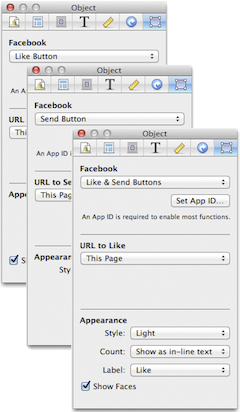
Variations
Like
- Lets your visitors "Like" your page and share it to their Facebook profile.
Send
- Lets your visitors send your specified URL to their Facebook friends.
Like & Send
- Combines the Like and Send buttons. Your visitors can still choose whether they want to just Like or just send or do both.
Settings
URL to Like/Send
- Choose the page you want your visitors to Like or send as either the current page or a URL that you'll type.
Appearance
Style
- Choose between Light and Dark. Dark looks better with a dark design or background.
Count (Like button)
-
Choose how the button shows the number of Likes:
- Show in bubble,wide
- The hit counter is displayed inside a bubble to the right of the button. (If the count is 0, the bubble is not displayed.)
- Show in bubble, tall
- The bubble is shown at the top of the button.
- Show as in-line text
- The Like counter is displayed as simple text with no background.
-
- Label
- Choose whether your want your visitors to "Like" or "Recommend" your page.
Show Faces (Like button)
- Shows or hides profile thumbnails of those who liked your page. This option is available when you choose "Show as in-line text" in the Count drop down.
Follow Button
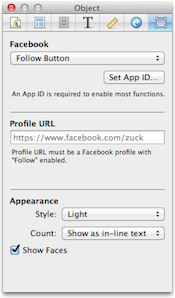
Allows your visitors to "Follow" or subscribe to your Facebook profile. The profile URL must be a Facebook profile with the "Follow" feature enabled. To enable this, go to https://www.facebook.com/about/follow and click the "Turn On Follow" button. You need to be signed in to Facebook to do this.
Profile URL
- To get your profile URL, log in to Facebook and go to your Timeline/Profile page. The URL of this page is your Facebook Profile URL.
Appearance
Style
- Choose between Light and Dark.
Count
- Choose how the button shows the number of your Facebook followers.
Show Faces
- Shows or hides profile thumbnails of those who liked your page. This option is available when you choose "Show as in-line text" in the Count drop down.
Like Box
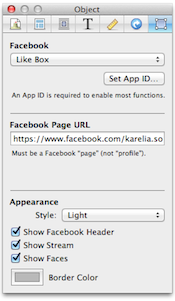
The Like Box enables you to attract and gain Likes to your Facebook Page from your Sandvox site. It displays the number of Likes and recent activity from your Facebook Page.
Facebook Page URL
- The URL must be a Facebook "Page" and not a "Profile".
Appearance
Style
- Choose between Light and Dark.
Show Facebook Header
- Shows/hides the "Find us on Facebook" header.
Show Stream
- Shows/hides recent activity on you Facebook page.
Show Faces
- Shows or hides profile thumbnails of those who liked your page.
Border Color
- Lets you choose the Facebook button border to match your preference or the design you're using.
Recommendations Box
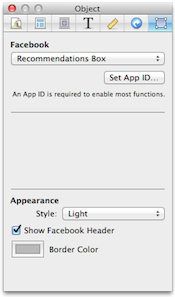
Gives your visitors personalized suggestions for pages on your site they might like. Recommendations will come from visitors who "Recommend" your page. Sandvox uses the App ID for your site as configured in the Configure Sharing Services sheet.
Appearance
Style
- Choose between Light and Dark.
Show Facebook Header
- Shows/hides the "Find us on Facebook" header.
Border Color
- Lets you choose the Facebook button border to match your preference or the design you're using.
Activity Feed
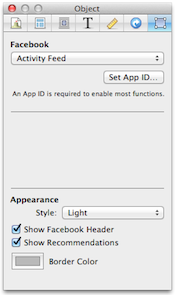
Shows your visitors what their friends are doing on your site through likes and comments. Sandvox uses the App ID for your site as configured in the Configure Sharing Services sheet.
Appearance
Style
- Choose between Light and Dark.
Show Facebook Header
- Shows/hides the "Find us on Facebook" header.
Show Recommendations
- Shows/hides personalized recommendations for your visitors.
Border Color
- Lets you choose the Facebook button border to match your preference or the design you're using.
Keywords: facebook, like, follow, social, network, share, recommend, recommendations, activity, feed, sharing
