IM Status
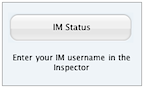
An IM Status object displays your availability for an Instant Messaging (IM) service. Visitors can click on the IM Status to open a chat with you. The IM Status supports Messages (AOL/AIM), Skype, and Yahoo! Instant Messenger.
OS X 10.7 and earlier versions use iChat in place of Messages. All references to Messages in this article are applicable to iChat.



IM Status Settings
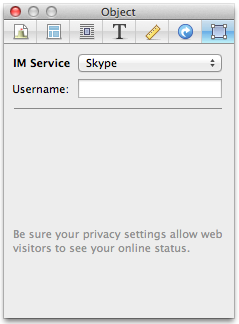
To edit IM Status settings:
- Click the object to select it.
- Open the Object Inspector.
- Select your chosen IM Service from the pop up menu.
Service & Username
Select the IM service (AIM or Skype or Yahoo!) that you wish to display. Then enter your username for that service.
Important: If you are using an IM Status with Messages (AIM), it will only display online or offline. If you set your status to away, it will still appear as online. So be sure to set your status to offline to avoid being disturbed.
If you are signed in to a service through multiple applications (desktop and/or mobile device), your IM status will show "online" if you're online in at least one of those applications.
Please note that for Skype, there are issues when viewing your website from Firefox. When clicking on the skype badge, viewers of your site may be prompted to install Skype, even if it is already installed on their computer. (We have reported this issue to Skype.)
Badge Labels
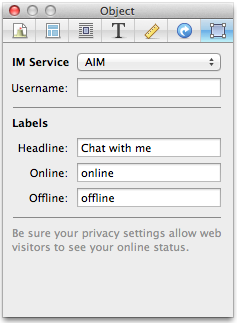
If you have selected AIM as the service, the text that appears on the headline as well as the online/offline status can be customized.
Privacy Settings
Before you can use an IM Status, you must ensure your AOL or Skype account is set up correctly to allow it.
If you use Skype:
- Open the Skype application on your computer. (You may need to download and install it first)
- Choose "Preferences…" from the "Skype" menu.
- Go to the "Privacy" controls.
-
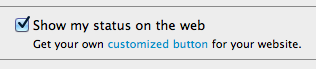
Check the box marked "Show my status on the web".
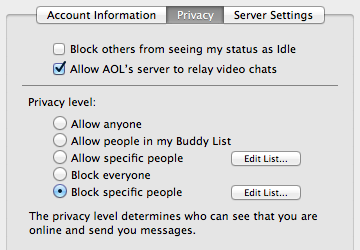
If you use Messages:
- Launch Messages and choose "Preferences…" from the "Messages" menu.
- Go to the "Accounts" controls and select your account in the column on the left.
-
In the "Privacy" tab ("Security" tab for iChat), set your privacy level to "Allow anyone" or "Block specific people."
If you use AOL/AIM with Adium:
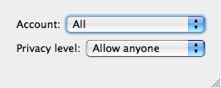
- Launch Adium and choose "Privacy Settings…" from the "Adium" menu.
- From the "Account" popup button, select "All" or your AOL/AIM account.
-
Set the privacy level to "Allow anyone" or "Block certain contacts."
Troubleshooting
Sandvox has no control over the online/offline status that is placed on your website. Sandvox simply includes the URL of the status graphic from your chosen instant messaging provider.
Very rarely your chosen instant messaging provider will have trouble reporting your stats accurately; unfortunately there is nothing that can be done except wait for messaging provider to correct itself.
Keywords: im, instant, message, messenger, messaging, messages, ichat, av, chat, chats, chatting, skype, skypeout, state, status, online, offline, yahoo, aol, aim, status
