Images
Sandvox can make extensive use of images throughout your site.
File Formats
Sandvox ensures that all images in your site are of one of these three formats:
- JPEG
- JPEG images are compressed (to make viewing your site quicker) and are great for photographs, but can sometimes lose some detail. All web browsers fully support JPEG images. JPEGs do not support transparency.
- PNG
- PNG images are slightly compressed, but do not lose any quality. They fully support transparency, but Internet Explorer (versions before 7) may experience problems handling this.
- GIF
- GIF images are compressed but can only handle a limited number of colors (making them unsuitable for photos). They have partial support for transparency, in that the pixels are either fully opaque or fully transparent. GIF images also allow for basic animation.
General Settings for All Images
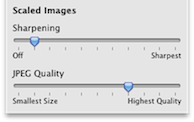
General image settings are found in under the Document Inspector under the Appearance tab.
The "sharpening" slider determines how much sharpening effect will be applied to photos after they are resized. You might be tempted to set this to "sharpest" but for most purposes a moderate sharpening effect is best.
If you have selected JPEG for your photo format, the quality (compression level) can be set for the JPEG images.
A high quality will result in better images, but larger file sizes (and therefore longer page loading times). A lower quality will give smaller files and quicker load times.
Individual Image Settings
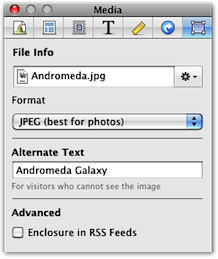
Individual image settings are found in the Object Inspector, once you have selected an image. Click the "Choose…" button to select a different media file.
You can select which format to publish the image as. See above for information on the basic differences between the formats.
The size of the image can be adjusted from the Metrics Inspector.
Linking to Larger Images
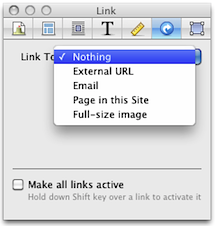
Independent of which photo image size you set, you can still link to a larger, full-size version of your image.
To link to the original, full-size image:
- Select the image
- Open the Link Inspector
- From the "Link To" popup, select "Full-size image"
Color Spaces
For optimal viewing on the web, a JPEG or PNG image should have its ColorSync profile set to sRGB. Sandvox automatically converts all images to the sRGB color space.
If you provide a JPEG or PNG images already in the sRGB color space — you can set this in Apple's Preview application and other image editing software — then Sandvox will use the original image file data when a full-size image is needed. (In other words, the image data will not be re-compressed when the size and the color space don't need adjusting.)
Cat image courtesy of stock.xchng
Keywords: image, images, graphic, graphics, photo, photos, picture, pictures, gif, gifs, .gif, png, pngs, .png, jpeg, jpegs, .jpeg, jpg, jpgs, .jpg, psd, .psd, photoshop, shop, animation, animate, animated, animates, tif, tiff
