Metrics Inspector
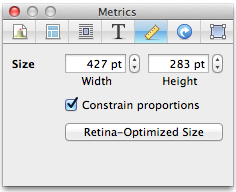
The Metrics Inspector is used to adjust width and height of objects.
If the "Constrain proportions" box is checked, adjusting height will change width to match, and vice versa. This applies when resizing the object in the Web View too.
Size Toggle
- Regular Size
- When clicked, this shrinks or expands the image to be the standard or size, where 1 point = 1 pixel. For example, a 400x400 pixel image will be resized to 400x400 points. If the source image is wider than what will fit on the page, it will be capped to the maximum width permitted.
- Retina-Optimized Size
- Clicking this will resize an image to 1 point = 2 pixels. So, a 400x400 pixel image will be resized to 200x200 points. This ensures that your image won't look pixelated on a Retina Display device. For more information, please refer to the Retina-Optimized Images help page. The image will also be capped to the maximum width permitted on a page based on the design used.
- This toggle is available if the "Optimize for Retina displays" box in the Appearance Tab of the Document Inspector is checked; otherwise, only the "Regular Size" button will be shown.
The button will toggle between the two values. But if your image has a very high resolution such that its retina-optimized size would be larger than what fits on the page, the button will not toggle.
Keywords: inspect, inspector, palette, float, floating, window, panel, setting, settings, attribute, attributes, i, property, properties
