RSS Badge
An RSS Badge is an object that allows visitors to easily find and subscribe to your site's RSS feed. The badge can use one of a number of standard RSS feed icons to clearly indicate that a feed is available.
Visitors click on the badge to view the RSS feed associated with it. With a suitable web browser, the feed will appear in either their browser or preferred RSS reader application. If the visitor has no RSS reader application installed, and their web browser does not support RSS feeds they will see the raw XML source of the feed instead.
To add an RSS Badge:
- Select the parent page of the collection where you want to add an RSS Badge.
- Choose "RSS Badge" from the Objects item in the toolbar.
- If you're adding the badge to a Blog or Photo Album collection, the RSS feed will automatically be generated, otherwise click the "Generate Feed" button, which will appear when you add the badge.
Note that Sandvox also offers RSS Feed objects, which are totally different. An RSS Badge links to an RSS feed for your site; an RSS Feed object displays the contents of an RSS feed from another, external site.
Settings
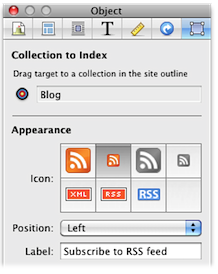
Collection to Index
Displays the collection where the badge is connected. You may also drag the target to another collection in the Site Navigator.
Icon
You can select one of the standard RSS feed icons to display, or you can elect to have no icon at all.
Position
The smaller icons can be positioned to the left or the right of the text, while the two large icons can only be placed centrally.
Label
You can include a label that will appear next to the icon. The label is optional and may be left blank unless you choose to have no RSS feed icon, in which case the label is required.
Keywords: rss, feed, feeds, discover, discovery, display, displaying, link, links, linked, linking, collection, collections
