Tweet Button
The Tweet Button is a small object which allows your visitors to:
- Share one of your web pages with their followers on Twitter.
- Mention your username in a Tweet.
- Include a hashtag of your choice in a Tweet.
- Follow you on Twitter.
It can be added by selecting "Twitter" from the Sharing Bar subcategory in the Objects item in the toolbar.
If you are looking for a way to share your Twitter timeline on your website, please see the Twitter article instead.

Tweet Button Variations
The Tweet button has four variations: share, mention, hashtag and follow. You can choose one and modify it via the Object Inspector
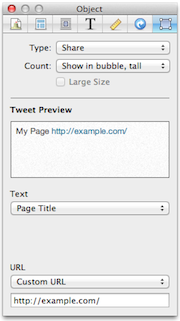
Share
This allows your visitor to share your website and any preset message you want to their Twitter followers.
- Count
- You can choose from having the share count appear at the top of the button, on the right, or not shown at all.
- Tweet Preview
- Shows what your visitors will have as the preset Tweet when they click the button.
- Text
- You can set the Tweet as the Page Title, custom text, or none.
- URL
- This has the URL of the page where the button is inserted set as the default, but you may change it to any URL you prefer.
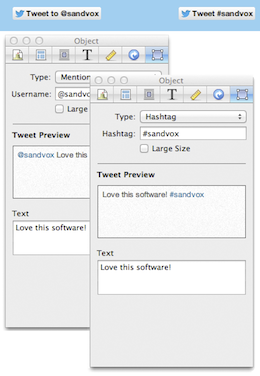
Mention
This variation allows you to add a Twitter handle/username to the preset Tweet and the Tweet button itself.
Hashtag
This adds a hashtag to the preset Tweet and the Tweet button.
Follow
This allows your visitors to follow you on Twitter. The username you provide here also appears in the Tweet button.
The steps a visitor goes through when using the Tweet Button are:
- The user clicks the Tweet Button
- The user is asked to login to Twitter if they aren’t already. If the user is new to Twitter they can also create an account.
- The Share Box appears already completed with the information provided in the properties of the Tweet Button. The user can change the content if they wish.
- Posting of the Tweet is confirmed and the user is suggested a maximum of two accounts they may wish to follow as provided in the properties of the Tweet Button.
- The Share Box remains open until the user presses close.
Keywords: twitter, tweet, object, objects, callout, callouts, sidebar, share, mention, hashtag, follow, social, sharing
